




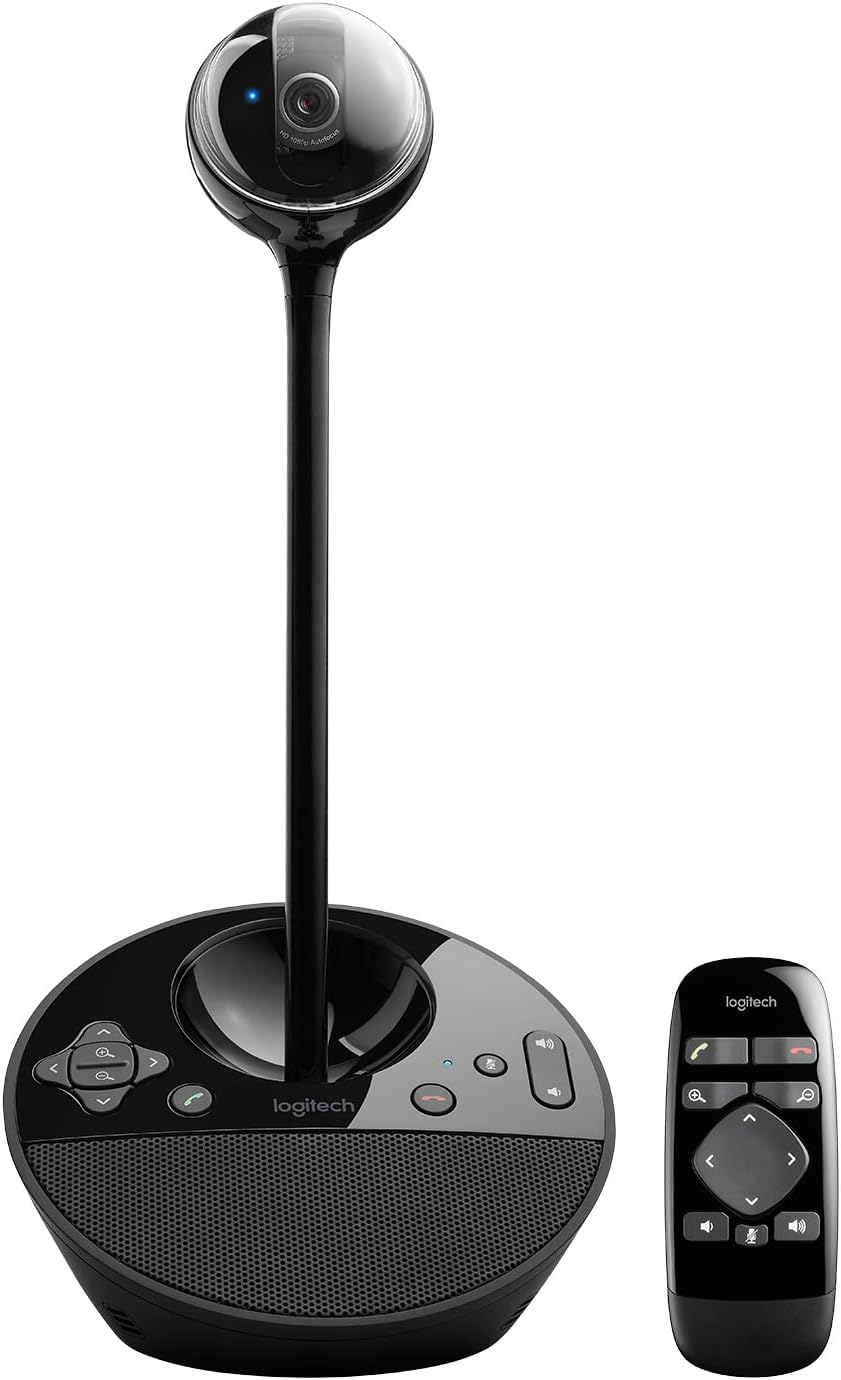


Logitech BCC950 Desktop Video Conferencing Solution, Full HD 1080p B23 Video Calling, Hi-Definition Webcam, Speakerphone with Noise-Reducing Mic, For Skype, WebEx, Zoom PC/Mac/Laptop/Macbook - Black
内部产品







Logitech BCC950 ConferenceCam for small groups
Logitech BCC950 turns any small room into a professional video conferencing space. Plug the all-in-one camera/speakerphone into a laptop and start your meeting with any video conferencing app.
All-in-one design
Just plug and play. BCC950 delivers wideband audio from a full duplex speakerphone and HD video from a motorized camera. It’s ideal for videoconferences with up to 4 people in the room.
Perfect for productive teams
Compact with a motorized eye-level camera, BCC950 is designed for small groups and rooms. An omni-directional speaker and noise-cancelling mic allow everyone to hear and be heard from 8 ft. away.
Compatible with most VC apps
BCC950 works with Windows, Mac and most any video conferencing application, including Skype for Business, Zoom, BlueJeans, Broadsoft, Cisco Jabber, Fuze, LifeSize Cloud, and Vidyo.
See eye-to-eye
Eye contact helps you make better connections with clients and offsite teams. Thanks to a motorized camera and innovative extender stem, BCC950 makes video conferencing feel easy and natural.
Next page
Previous page
Natural sound
Echo and noise canceling technology suppresses distracting background noises and annoying echo so voices sound clear and natural. Enjoy room-filling sound or plug in your earbuds for privacy.
Handheld remote control
Control BCC950’s camera and audio on the speakerphone or from across the room with the handheld remote control. Either way, that all-important mute button stays in easy reach.
USB plug-and-play connectivity
With no special software, training, or maintenance required, videoconferencing has never been easier. Simply plug BCC950 into your PC or Mac and join your meeting.
Quality optics
Enjoy bright, clear video up to HD 1080p with accurate color rendition and sharpness. Pan 180 across the room, and zoom in up to 1.2x in HD or 4x in SD to focus on the details.
Next page
System Requirements & Compatibility
Windows 7, 8.1, 10 or later
macOS X 10.7 or higher
Plug-and-play USB connectivity
Works with most any video conferencing application or meetings service, including Skype for Business, BlueJeans, Broadsoft, Cisco Jabber, Cisco WebEx, Fuze, LifeSize Cloud, Vidyo, and Zoom
BCC950
Compare ConferenceCams
S Suggested room size M/L
Up to 4 people Meeting size Up to 14 people
78 degrees Field-of-view 90 degrees
1080p Full HD HD Video quality 1080p Full HD
1 mic + speaker Speakerphone & mic 4 mics + speaker
1.2X HD zoom 10X
Pan/Tilt/Remote
S Suggested room size L
Up to 4 people Meeting size Up to 20 people
78 degrees Field-of-view 90 degrees
1080p Full HD HD Video quality 1080p Full HD
1 mic + speaker Speakerphone & mic 6 mics + speaker
1.2X HD zoom 10X
Pan/Tilt/Remote
S Suggested room size S/M
Up to 4 people Meeting size Up to 6 people
78 degrees Field-of-view 120 degrees
1080p Full HD HD Video quality 4K Ultra,1080p,720p
1 mic + speaker Speakerphone & mic 3 mics + speaker
1.2X HD zoom 5X
Pan/Tilt/Remote
S Suggested room size S
Up to 4 people Meeting size Up to 6 people
78 degrees Field-of-view 90 degrees
1080p Full HD HD Video quality 1080p Full HD
1 mic + speaker Speakerphone & mic 2 mics + speaker
1.2X HD zoom 4X
Pan/Tilt/Remote
Previous page
GROUP
GROUP+Expansion Mics
MeetUp
Connect
Next page
Learn More
Learn More
Learn More
Learn More
The first all-in-one video and audio conferencing system for small groups
View largerLogitech ConferenceCam BCC950
Small group video conferencing has arrived everywhere. Now you can instantly transform any office or meeting space into a business-grade small group video conference room. Logitech’s ConferenceCam BCC950 is the first all-in-one video and audio conferencing device designed with small groups in mind. It combines a freestanding wide-view HD webcam with an enterprise-quality speakerphone in one easy-to-use, computer-connected device. Small groups can run their own video conferences anywhere in the office, without huddling around PC webcams or competing for time on overbooked conference room systems.Setting the Standard
The award-winning ConferenceCam BCC950 is making high-quality group video conferencing more affordable and accessible to businesses of all sizes.
Business-grade HD video
Experience desktop video meetings so clear and razor sharp, you’ll feel like you’re face-to-face in the same room. With 1080p HD video at a smooth 30 frames per second, precision autofocus, a premium Carl Zeiss lens, and advanced auto light correction, everyone in the room can be clearly seen in professional high-quality video—even in low light or backlit conditions.View largerProfessional Speakerphone
The built-in full duplex speakerphone&mndash;and integrated omni-directional microphone with both noise and echo cancellation—allow everyone in the group to hear and be heard clearly up to eight feet away from the ConferenceCam.A wider field of view, perfect for group meetings
View largerFull-room View
A 78-degree field of view and 180-degree video pan ensure that each member of the small group is seen in your meetings. You have far more freedom to move around the room, interact together, and show presentation materials than you would with the limited field of view of built-in computer webcams.Pan, tilt, zoom, and control audio with included remote
View largerVersatile Voice & Video Control
With the included remote control and console buttons, you can instantly pan, tilt and zoom the camera to focus on the entire team, the meeting leader, or detailed close-ups of whiteboards, documents, design layouts, and product demonstrations. Easy controls for answer/end calls, volume up/down and mute are all at your fingertips.Plug-and-Play Simplicity
Unlike operating highly technical conferencing systems, the Logitech ConferenceCam is so intuitive that anyone in the office can easily setup and control video meetings. There’s no software to install. Simply plug the USB cable into a PC or Mac and start the meeting using virtually any video conferencing platform.App-friendly Compatibility
You can immediately deploy small group video conferencing without a proprietary and expensive system to set up. ConferenceCam BCC950 works on virtually any desktop video conferencing and Unified Communications application. System Requirements: Windows 7 8.1 or 10macOS X 10.7 or higher
-

Mossie McGlynn
14-07-2026Works well as advertised, though the user manual could be a bit clearer. Exceeded expectations.
-
Sherwood Ortiz
31-08-2026Crystal clear sound and display. Worth every single penny! Packaging was great as well.
-

Deangelo Stamm MD
01-10-2026Very reliable electronic device. Fast charging and seamless pairing. Totally worth it.
-
Boris Harvey III
17-08-2026Solid connection, premium materials, absolutely love this gadget. Five stars from me.
-
qqqqq
09-10-2026Top-notch tech gadget, very useful for my daily work and travel. Fast delivery too!
-
zxcvbnm
27-08-2026Very reliable electronic device. Fast charging and seamless pairing. Will definitely buy again.
-
Abby1994
26-09-2026Crystal clear sound and display. Worth every single penny! Totally worth it.
-
qqqqq
27-07-2026Top-notch tech gadget, very useful for my daily work and travel. Will definitely buy again.
相关产品