




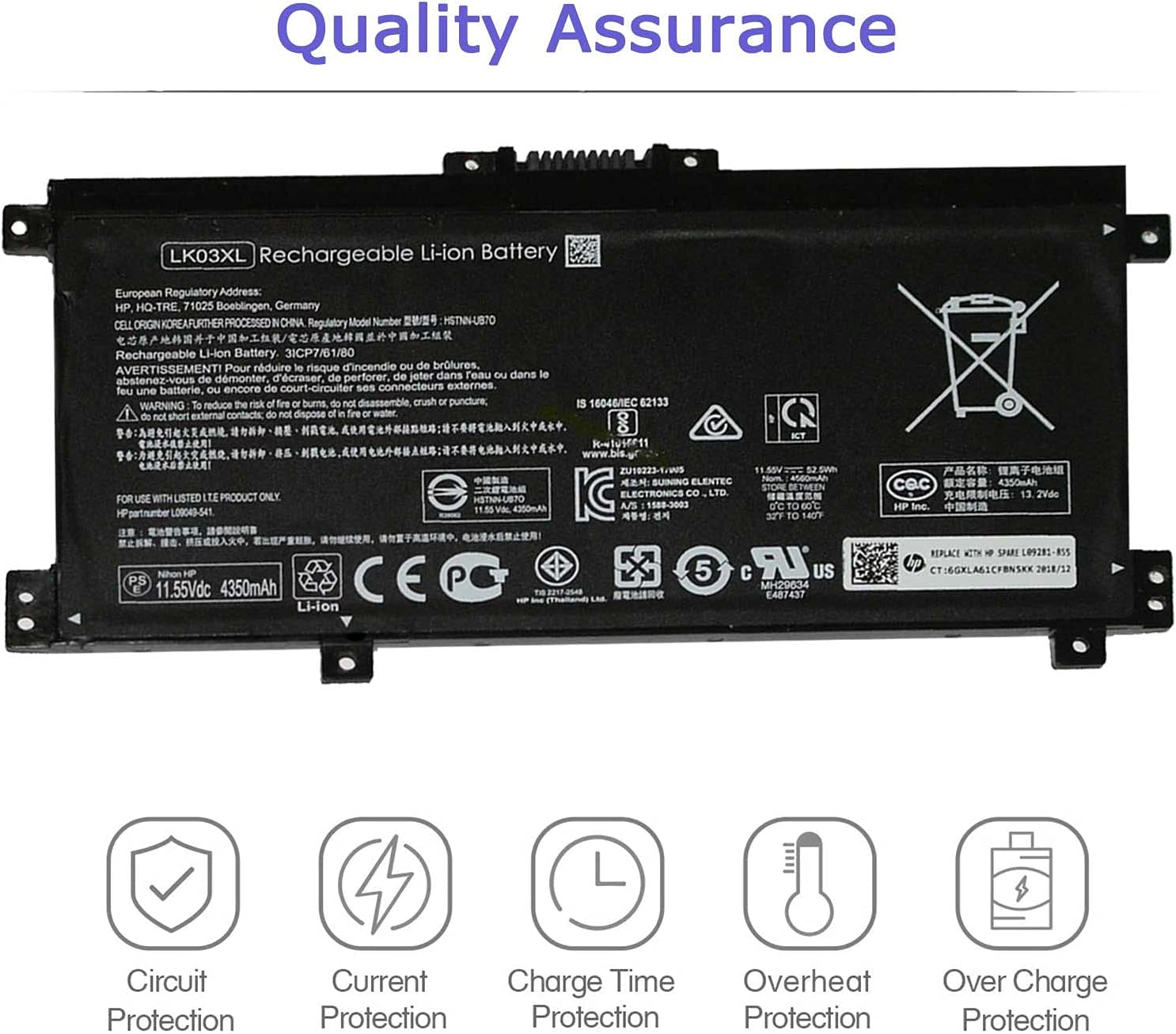
LK03XL Laptop Battery for HP Envy X360 Convertible 17-AE 17M-AE 17T-AE 17-BW 17M-BW 17-CE 17M-CE 17T-CE 17T-BW Envy X360 15-BP 15M-BP 15-BQ 15M-BQ 15M-CP L09281-855 916814-855 916368-541 916368-421
内部产品







Grade A cell ensure fast charges and low power consumption; Built-in circuit protection ensures both safety and reliability.
HP Battery LK03XL Smart Control Chip
Built in smart control chip conveniently offers Quicker charging, lower power consumption and longer discharge time.
HP Battery LK03XL Smart Control Chip
All of our batteries are brand new and are 100% compatible to meet OEM specifications for safety and efficiency.
Specifications:
Model: LK03XL
Voltage: 11.55V
Capacity: 55.8Wh
Condition: 100% Brand New
Compatible Part Number:
LK03XL, LKO3XL, LK03048XL, LK03055XL, 916368-421, 916368-541, 916814-855, HSTNN-LB7U, HSTNN-LB8J, HSTNN-UB71, HSTNN-UB7I, L08855-856, L08934-1B1, L09281-855, L08934-2C1, L09049-1B1, L09280-855,L09911-141, L09911-421, TPN-W127, TPN-W128, TPN-I129
Compatible Laptop Models:
(Use "Ctrl"+"F" to find your model)
In order to purchase the correct battery we recommend that you open the back cover of your laptop and confirm the original battery model.
-- HP Envy x360 15-BP 15M-BP Series:
- 15-BP000 15-BP001TX 15-BP002TX 15-BP003TX 15-BP004TX 15-BP005TX 15-BP006TX 15-BP107TX
- 15-BP100TX 15-BP105TX 15-BP101TX 15-BP103TX 15-BP104TX 15-BP106TX 15-BP102TX 15-BP013TX
- 15-BP103UR 15-BP195NIA 15-BP003NX 15-BP004NA 15-BP101NIA 15-BP102NG 15-BP109UR 15-BP143CL
- 15-bp194cl 15-bp165cl 15M-BP000 15M-BP012DX 15M-BP011DX 15M-BP1XX 15M-BP111DX 15M-BP112DX.
-- HP Envy x360 15-BQ 15M-BQ Series:
- 15-BQ000NB 15-BQ001NA 15-BQ000NO 15-BQ000UR 15-BQ001NB 15-bq213cl 15-bq150na 15M-BQ121DX
- 15m-bq1xx 15M-BQ021DX.
-- HP Envy x360 15-CN 15M-CN Series:
- 15-CN0000TU 15-CN0000TX 15-cn0001la 15-CN0001NA 15-CN0001TU 15-CN0001TX 15-CN0002TU
- 15-CN0002TX 15-CN0003CA 15-CN0003TU 15-CN0003TX 15-CN0004TU 15-CN0004TX 15-CN0005TU
- 15-CN0005TX 15-CN0006TU 15-CN0006TX 15-CN0007TU 15-cn0013nr 15-cn1073wm 15M-CN0011DX 15M-CN0012DX.
-- HP Envy x360 15M-CP Series:
- 15M-CP0012DX 15M-CP0011DX 15m-cp0xxx 15Z-CP000.
-- HP Envy X360 17-AE 17M-AE Series:
- 17-AE001NB 17-AE001NF 17-AE006NG 17-AE107NB 17-AE002NO, 17-ae000 17-ae003ng 17-ae004ng
- 17-ae005ng 17-ae006ng 17-ae007ng 17-ae009ng 17-ae030ng 17-ae031ng 17-ae100, 17-ae101ng
- 17-ae102ng 17-ae103ng 17-ae120nd 17-ae130ng 17-ae131ng 17-ae140ng 17-ae141ng 17-ae142ng
- 17-ae143ng 17-ae165nr 17-ae120nr 17M-AE011DX 17M-AE111DX 17M-AE0XX 17M-AE011XX.
-- HP Envy X360 17-BW 17M-BW Series:
- 17-bw0003ca 17-BW0008CA 17-BW0011NR 17-BW0503NA 17-BW0707NZ 17M-BW0013DX.
-- HP Envy X360 17-CE 17M-CE 17t-bw 17t-ce Series:
- 17m-ce0013dx 17m-ce1013dx 17-CE0002CA 17-CE0003CA 17-CE0008CA 17-CE0015NR 17t-bw000 17t-ce000 17t-ce100.
Tips:
- This battery model are compatible with HP Envy X360 17-AE 17M-AE 17-BW 17M-BW 17-CE 17M-CE 17t-bw 17t-ce Series and HP Envy X360 15-BP 15-BQ 15-CN 15M-BP 15M-CP 15M-CN All Models.
- But not all compatible models are listed here, you can open the back of your laptop to check the original battery model.
- Before you buy this battery, in order to prevent unnecessary troubles caused by buying the wrong battery model, please check or consult the model that your laptop battery is compatible with. If you are not sure whether it can fit your computer, you can tell us. For the notebook model, we will give you a satisfactory answer.
Battery care instructions:
1. Please use up the new battery to about 10-20% full charge and repeat 3-5 times to check whether there is a problem and stabilize the battery capacity.
2. Remember not to discharge the battery to 0%, otherwise it is easy to damage the battery.
3. After the battery is exhausted, please charge it in time. If it is not charged for a long time, the battery may be damaged.
4. If the battery is not used for a long time and needs to be stored above 70%, the storage time should not exceed 3 months.
5. If you use the charger frequently, please use the battery power regularly, and use it more than once a week.
6. Please use the original charger or famous brand charger, inferior charger will affect the normal charging of the battery.
7. Regularly clean the fan dust, increase the heat dissipation effect, reduce the power consumption, and effectively extend the battery life.
How do I get my laptop to recognize a new battery?
1. Unplug all external devices from the laptop.
2. Take out the battery.
3. Press the power button of the laptop for about 10-15 seconds.
4. Insert the battery and restart the computer.
5. Connect the AC adapter and check if your machine can detect the battery again.
See Details
See Details
See Details
See Details
See Details
Customer Reviews
—
—
—
—
—
Price
—
—
—
—
—
Cell 2 Cells 3 Cells 3 Cells 3 Cells 3 Cells
Voltage 7.7V 11.55V 11.55V 11.55V 11.4V
Capacity 41Wh 41.9Wh 41.7Wh 61.6Wh 56Wh
Battery Type Lithium ion polymer Lithium ion polymer Lithium ion polymer Lithium ion polymer Lithium ion polymer
Circuit Protection
✓
✓
✓
✓
✓
Current Protection
✓
✓
✓
✓
✓
Over Heat Protection
✓
✓
✓
✓
✓
Over Charge Protection
✓
✓
✓
✓
✓
Charge Time Protection
✓
✓
✓
✓
✓
-

Mr. Braden Hermiston
02-09-2026A very pleasant shopping experience. Matches description completely. Fast delivery too!
-
zxcv
11-09-2026A very pleasant shopping experience. Matches description completely. Five stars from me.
-

Pearline Marks V
11-09-2026Very satisfied with this purchase. Customer service was also very helpful.
-
tt
11-09-2026Good value for money. Arrived a bit earlier than expected. Five stars from me.
-
Jeeny
08-09-2026Very satisfied with this purchase. Customer service was also very helpful. Totally worth it.
-
555
26-08-2026Amazing product! Fast shipping and exceptional overall quality.
相关产品